After finishing the Discord photo frame project (or at least getting it to a stable spot!) I knew I wanted to try my hand at a more traditional discord bot - one that used Discord as a medium rather than a simple IO, as well as something intended to be used by a (small) community.
Luckily I had just the task - I’ve got a group of friends I’ve been playing League with for the last… well, when did League come out? Anyways, we never take gaming too seriously and have a ritual for when we have to choose champions. You see, just giving everyone agency to choose whoever they want to play is not enough for us. We need risk. We need reward.
We need a gimmick.
The concept is before we start a new round, someone calls out a gimmick everyone must adhere to when choosing their champion. The gimmicks are sometimes prescriptive (“Must have hair”, or “Small champions”), but often are chaotic and completely unintelligible (“Bort Sampson”).
Eventually after playing like this for a while we put together a Google Sheet with the gimmicks we had come up with and a simple script to select display a random one one when refreshing the page. This worked pretty well, but of course, you need to separately open the tab, and perhaps more importantly the randomly selected gimmick was different for each person on the page, necessitating someone to copy paste the current gimmick into Discord (which we are using for comms).
There’s got to be a better way!
The MVP for the project became immediately clear:
- From Discord alone, anyone can “roll” a gimmick with a simple command
- A randomly selected gimmick is then displayed to everyone in the server.
Sounds simple enough, let’s get to work!
The first challenge in the design is to decide how to build the database of gimmicks. My first instinct was to continue to use the Google Sheets we already had - though I quickly dismissed this idea. Sheets has an API and Python support, but is both way overly complicated and kludgy for this kind of work.
I had not worked with (non-Unreal) databases since college, so at first I was a bit intimidated by the looming realization I may need to actually relearn SQL. I found a nice little Python library named Dataset that gives baby’s first access to sqlite. Alright, I guess we’re playing with the big boys now.
I had already created an interesting little dev environment for my last discord.py project, which of course was running on my recently mounted Raspberry Pi Zero W2, so I figured I would continue to use that platform. Admittedly it is a bit ridiculous to host a Discord bot on what is essentially a photoframe, but hey, it has the compute! It has storage! Who needs any of this fancy virtualization crap, let’s just run on good ol hardware! I had figured out how to run the Discord Photo Frame as a service under Debian, so this will just run as a different one. Let’s go.
Getting started proved pretty simple. I managed to statically write some data to the database (locally!) and later retrieve it. I had to do some research on how Discord bots work as far as “Commands” go. I did have to go through some refactors after learning about @bot.command - essentially there are some built in ways to simply listen for a phrase on a server and run a function, go figure.
The database contained a few columns: Title, Author, Description, Date. I ran into some trouble storing the built in python datetime type so I ended up just storing the date as a string… whoops. I couldn’t figure out any good way to convert the google sheet entries into the SQL database so I made a “program” that manually entered each one - IE I made a .py with a ton of:
table.insert(dict(Date=str(datetime.datetime(2022, 10, 28)), Title='Spoopy', Description='Spooky champs', Frequency=2, Wins=1, Losses=1, Author=Unknown))
…yeah, not my finest work. The random selection code is more or less boilerplate: db.query(‘SELECT * FROM Gimmick ORDER BY RANDOM() LIMIT 1’).
Naturally after completing the MVP I wanted to expand. Users should have a way to add new gimmicks to the database… why not straight though Discord? This ended up being pretty simple - listen for a command ($newgimmick), get the arguments (“Gimmick Name” “Gimmick Description”), then pass them along to the database. I even managed to snag the date (ctx.message.created_at) and username (ctx.author.display_name) from the post!
@bot.command(name="newgimmick", description="Enter a new gimmick. ")
async def newgimmick(ctx, title: str, desc: str):
    """Enter a new gimmick. $newgimmick \"Gimmick Name\" \"Gimmick Description\""""
    print(ctx.message.created_at)
    imageURL = None
    for attachment in ctx.message.attachments:
        imageURL = attachment.url
    WriteNewGimmick(title, desc, ctx.author.display_name, ctx.message.created_at, imageURL) #swapped to display name (chosen name lol)
    await ctx.send('Gimmick set by ' + ctx.author.display_name)

def WriteNewGimmick(title, desc, author, messageDate, imageURL):
    table = db['Gimmick']
    table.insert(dict(Date=str(messageDate), Title=title, Description=desc, Author=author, Frequency=0, Wins=0, Losses=0, Image=imageURL))
table.insert(dict(Date=str(messageDate), Title=title, Description=desc, Author=author, Frequency=0, Wins=0, Losses=0, Image=imageURL))
You’ll notice wins / losses on there… I had found Discord supports buttons with the “View” class. Perfect, this gives me an idea for the next features:
- After rolling a gimmick, the users can select whether they won or lost the game. That data is stored in the DB and shown the next time anyone rolls.
- Users can request a specific gimmick to display
The specific gimmick request require a minor refactor but ultimately was not too challenging. I ended up with this:
#Changed this to "retrieveGimmick" with an optional argument for title. Roll random if null
@to_thread
def retrieveGimmick(gimmickTitle=None):
    if gimmickTitle == None:
        result = db.query('SELECT * FROM Gimmick ORDER BY RANDOM() LIMIT 1')#Pick a random entry from the DB!
        for Gimmick in result:
            gimmickTable = Gimmick
    else:
        statement = "SELECT * FROM Gimmick WHERE LOWER(Title) = '" + gimmickTitle.casefold() + "' LIMIT 1"
        result = db.query(statement)
        for Gimmick in result:
            gimmickTable = Gimmick
    if gimmickTable == None:
        print("Attempting to read null from DB - likely due to the entry requested not being found. Probably should alert user")
        return
    gimmickTable['Frequency'] += 1 #increment
    db['Gimmick'].update(gimmickTable, ['Title'])
    return gimmickTable
The win / loss buttons are quite a bit more complicated. Essentially they increment or decrement the appropriate value in the DB, and then update themselves / the view they live in to grey out. This ended up working surprisingly well - I has expected multiple users clicking on the buttons with latency and all would wreck havoc on the code but it seems to be quite resilient!
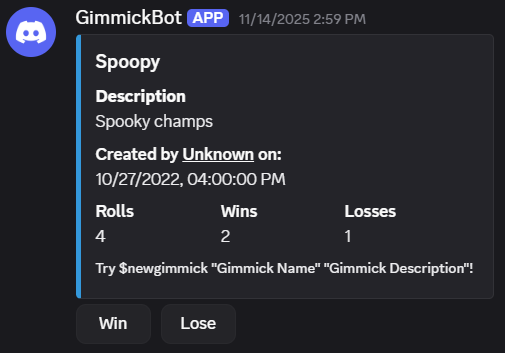
I seem to have taken this project to a good logical stopping point. The bot is both super janky and highly functional - just the way I like it. I’ve had it running for months now and continues to be a total gas with my friends.
As a side note I’m gonna be pretty sad once Discord eventually eats itself with the IPO. Who knows, maybe I’ll be super wrong, but I have a feeling I’ll be porting this project over to something else sometime in the next couple of years… or maybe League will die first. Gimmicks though?